purple fox msi analysis
 A couple of months ago, I came across an intriguing
 .tmp file that was sent to me. The sender mentioned that their antivirus software had flagged and caught the file on their computer. Naturally, I decided to investigate further. Although the file was labeled as a .tmp file, running it through a file utility revealed that it was actually an MSI (Microsoft Software Installer) file.
To delve deeper into the MSI file, I utilized a helpful utility called msitools. For more information on msitools, you can visit this link. MSI files serve as installers for Windows programs, containing databases, actions, and sequences. Instead of providing an extensive explanation here, I recommend referring to this excellent resource to learn more about MSI files: Threat Analysis: MSI-Masquerading as Software Installer.
Using the msiinfo tool, I examined all tables and streams within the installer. Here is an image showing the results:
 Next, I proceeded to extract the files for further analysis. I utilized
 msidump with the -s and -t options to dump the streams and tables, respectively.
With the files successfully dumped, I was able to inspect the idt files. It’s worth noting that two folders are generated upon dumping the MSI file: “binary” and “streams.” Among these folders, the customAction.idt file caught my attention as it contained some VBS code.
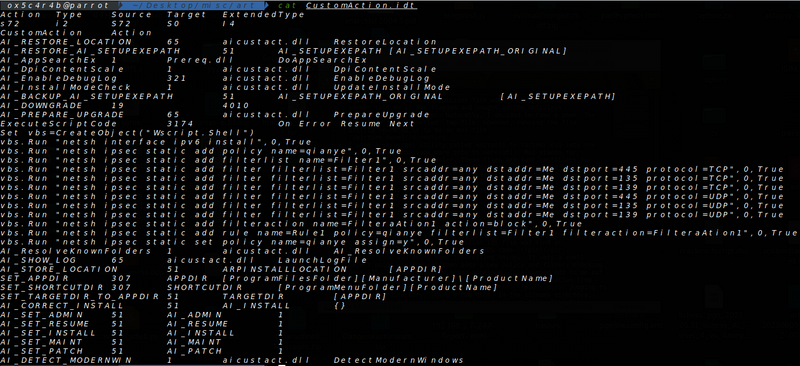
Upon examining the VBS code, I discovered some interesting functionalities. The code creates a shell object using Wscript and adds a new policy and filters to block ports 135, 139, and 445 from being accessed. This initially seemed peculiar to me, but after conducting further research, I found that it was implemented to deter exploitation from rival threat actors, as explained in this article: Purple Fox Rootkit Now Propagates as a Worm.
Within the binary directory, two DLLs can be found. Here is an image displaying the contents:
 In the
 streams directory, various files are present, including a disk1.cab file. By using 7z, this file can be extracted to reveal additional files such as winupdate64.log and winupdate32.log.

Among these files, we see the two dlls found in the binary folder.
The winupdate32 and winupdate64 files are payloads designed for 32-bit and 64-bit Windows systems, respectively. Both of these PE files are packed with VmProtect. There’s also sysupdate,log which contains an encrypted dll and rootkit.
For dynamic analysis, once the MSI file is executed, a window appears that installs either the 32-bit or 64-bit binaries.
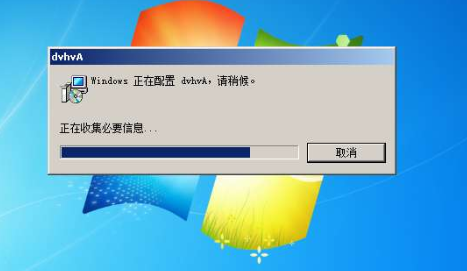 After the installation is complete, the machine is rebooted, installing Ms{8-random-characters}App.dll, which was encrypted in sysupdate.log file, in C:\windows\system32. This step ensures that a rootkit is present on the machine, thus ensuring persistence.
Since I did not have access to Remnux or FLARE, I relied on tools such as VirusTotal, Intezer Analyze, and unpac.me to conduct a basic high-level analysis. To protect yourself from similar attacks, it is crucial to avoid using pirated software and to employ reliable antivirus or EDR solutions.
md5 hash: e815a06c36238d3279791e6e17c4f332